Standby UPS vs. Line-Interactive UPS: Which Should You Choose?
Quick answer
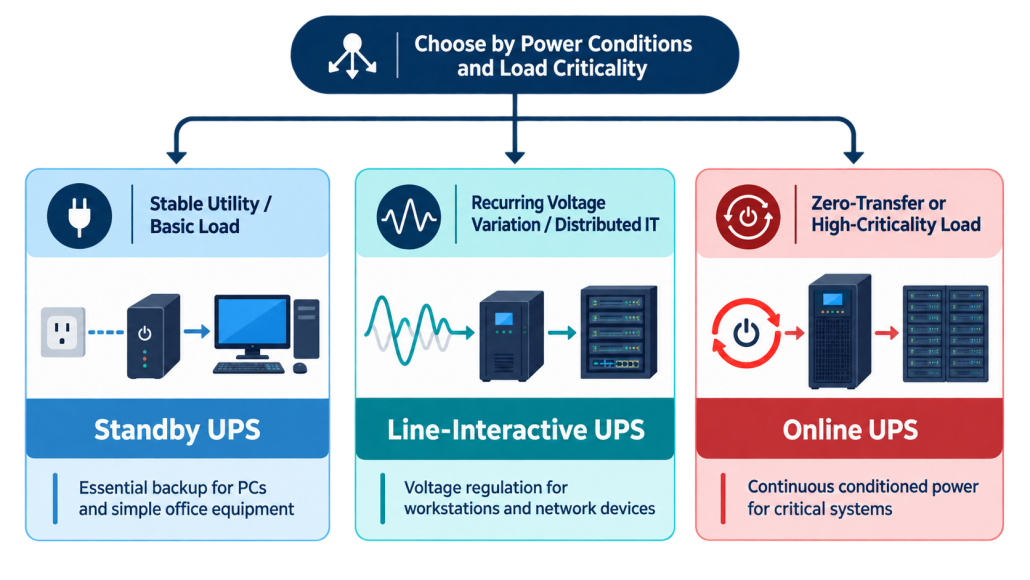
Choose a standby UPS when utility power is generally stable and you need economical backup for basic electronics. Choose a line-interactive UPS when voltage sags or overvoltage occur regularly, or when workstations and network equipment justify automatic voltage regulation and stronger management options. If the load requires zero transfer time or tighter power conditioning, consider an online double-conversion UPS instead.
A standby UPS and a line-interactive UPS can look almost identical from the outside. Both may sit under a desk or in a small rack. Both normally power the load from utility AC, maintain a charged battery, and switch to inverter output when the incoming supply fails. That surface similarity is why buyers often compare only price, VA rating, and the number of outlets.
The more important difference is how each topology responds before a full outage occurs. A standby UPS generally passes acceptable utility power to the load and transfers to battery when the input moves outside its permitted range. A line-interactive UPS adds automatic voltage regulation, commonly using buck/boost transformer taps, so it can correct many voltage deviations without discharging the battery.
That difference matters in locations with recurring brownouts or overvoltage. It does not mean that every line-interactive model is automatically faster, produces a pure sine wave, or provides longer runtime. Those are product-level specifications, and they must be checked separately.
Standby UPS vs. Line-Interactive UPS at a Glance
| Decision factor | Standby UPS | Line-interactive UPS |
| Normal power path | Utility power passes through within the accepted input range | Utility power passes through with active monitoring and voltage correction where supported |
| Voltage regulation | Usually no buck/boost AVR; transfers to battery when thresholds are crossed | AVR corrects many undervoltage and overvoltage conditions without battery use |
| Transfer to battery | Brief, nonzero transfer time | Brief, nonzero transfer time; not guaranteed to be faster than standby |
| Battery-mode waveform | Simulated or pure sine wave, depending on model | Simulated or pure sine wave, depending on model |
| Power-quality coverage | Basic outage, surge, and model-specific filtering protection | Adds voltage correction; still does not equal online double-conversion isolation |
| Battery use on unstable voltage | May transfer more often when input crosses limits | AVR can reduce avoidable battery transfers within its correction range |
| Typical fit | Routers, modems, basic PCs, peripherals, simple POS where utility is stable | Workstations, NAS, switches, branch-office IT, and small server environments |
| Relative cost | Usually lower | Usually higher because of AVR and often richer controls |
These are topology-level tendencies, not substitutes for a datasheet. Input range, transfer time, waveform, surge rating, efficiency, monitoring, battery capacity, and runtime can differ substantially between products in the same class.
How Does a Standby UPS Work?
A standby UPS, also called an offline UPS, uses the simplest of the common UPS topologies. During normal operation, accepted utility power follows a direct path to the connected equipment while a charger maintains the battery. The inverter is not supplying the load continuously.
When the UPS detects a blackout or an input condition outside its transfer limits, an internal switch moves the load to the battery-powered inverter. The change happens in milliseconds, but it is not instantaneous. Many desktop power supplies and small network devices can ride through this brief interruption; unusually sensitive loads may not.
The design is efficient, compact, and economical. It is a practical choice when grid voltage is usually stable and the main goal is enough battery time to save work, shut down safely, or keep a router and modem online through a short outage. Its limitation is that modest voltage variation may be passed through until a transfer threshold is reached, and a poor power environment can force more frequent battery operation.
How Does a Line-Interactive UPS Work?
A line-interactive UPS also supplies the load from utility power during normal conditions, but it adds voltage-regulation capability. In many designs, an automatic voltage regulator changes transformer taps to boost low input voltage or reduce high input voltage without moving the load to battery.
If the input moves beyond the correction range, the frequency becomes unacceptable, or utility power fails, the UPS transfers to inverter output. This topology therefore still has a transfer event; zero transfer time is a characteristic associated with online double-conversion operation, not line-interactive operation.
Because AVR can handle many recurring voltage disturbances without discharging the battery, a line-interactive UPS can be a better match for home offices, retail systems, branch locations, network closets, workstations, NAS devices, and distributed IT. Many products in this class also offer better displays, communication, shutdown software, or remote-management options, but those features are not guaranteed by the topology itself.
The Differences That Matter Most
1. Automatic voltage regulation
AVR is the clearest functional difference. A line-interactive unit can keep many voltage sags and overvoltage events within a usable output range without drawing on the battery. A standby unit normally waits until the input crosses a transfer threshold and then changes to battery mode. If lights dim frequently, equipment reports low-voltage events, or the UPS clicks into battery several times a week, AVR may offer meaningful value.
AVR should not be confused with complete power conditioning. It corrects certain voltage conditions within a specified input window. It does not continuously recreate the output waveform or isolate the load from every frequency variation, harmonic, or fast electrical disturbance. Where those risks are material, review online double-conversion systems.
2. Transfer time
Both standby and line-interactive systems normally have a brief transfer time when they move from utility power to battery-backed inverter output. Marketing summaries often assign a universal range to each topology and imply that line-interactive is always faster. Real product specifications overlap, so that shortcut is unreliable.
Check the maximum transfer-time specification for the exact UPS and compare it with the tolerance of the protected load. For ordinary computers and networking hardware, a compatible power supply often rides through a short transfer. A critical control system, specialized instrument, or load that has already rebooted during brief events needs a more careful compatibility review.
3. Output waveform and load compatibility
Topology does not guarantee battery-mode waveform. Entry-level products in either class may use a simulated or stepped sine wave, while other models provide pure sine-wave output. Modern equipment with active power-factor-correction power supplies, high-end workstations, servers, and some audio or control equipment may have stricter waveform requirements.
Do not assume a simulated waveform will damage every modern device, and do not assume every line-interactive UPS is pure sine. Verify the UPS datasheet and the equipment manufacturer’s compatibility guidance. If the load is valuable or difficult to test, pure sine-wave output is the safer specification.
4. Battery use and service life
Frequent discharges, high temperature, poor charging conditions, and time all affect UPS batteries. In an unstable voltage environment, a standby UPS may transfer to battery repeatedly when the input crosses its limits. A line-interactive UPS can correct many of those events through AVR, which may reduce unnecessary battery cycling.
That does not guarantee longer battery life. Battery chemistry, cell quality, float or charge strategy, ambient temperature, depth and frequency of discharge, and maintenance all matter. Compare the complete system and its warranty rather than treating topology as a battery-life rating.
5. Runtime
Standby and line-interactive describe power paths, not backup duration. Runtime depends primarily on battery energy, the connected watt load, conversion efficiency, battery condition, and temperature. A lightly loaded standby unit can outlast a heavily loaded line-interactive unit, and the reverse can also be true.
Use the manufacturer’s runtime curve for the exact model and battery configuration. Decide whether the UPS must support an orderly shutdown, bridge a generator-start interval, or keep the load operating through a longer outage. Adding battery packs can increase runtime on approved systems, but it does not increase the UPS power rating.
Which UPS Should You Choose?
Choose a standby UPS when the need is basic and the utility is stable
A standby UPS is usually sufficient for a modem, router, basic desktop, monitor, small peripheral set, or simple point-of-sale installation when utility voltage is generally stable. The load should tolerate the model’s transfer time and battery-mode waveform, and the main objective should be short-duration backup or graceful shutdown at the lowest practical cost.
This is not the place to buy on VA alone. A low-cost unit can still be the wrong choice if its watt rating is below the real load, its outlets do not support all critical devices, or its waveform is incompatible with the protected equipment.
Choose a line-interactive UPS when voltage quality and IT continuity matter more
Line-interactive is the stronger default when a site experiences recurring sags or overvoltage, when battery transfers are common, or when the protected load includes a workstation, NAS, network switch, branch-office server, security recorder, or retail system whose interruption has a clear business cost. AVR can keep the system on utility power through many voltage events, while higher-specification models often add pure sine-wave output and useful management features.
For an unattended network closet, monitoring and controlled shutdown may matter as much as topology. Look for USB or network communication, event logs, replaceable batteries, alerting, load-segment control, and software support that matches the operating environment.
Move beyond both when the load is mission-critical
Neither standby nor line-interactive provides the continuous AC-to-DC-to-AC conversion of an online UPS. If the system cannot tolerate any transfer interval, utility frequency is unstable, the site operates from a difficult generator source, or the load requires tighter and continuous output conditioning, online double-conversion deserves consideration.
Critical medical, industrial, safety, and life-support applications also require equipment and system designs approved for those uses. A general buying guide cannot replace the equipment manufacturer’s instructions, applicable codes, or professional engineering review.
How to Size and Specify the UPS After Choosing a Topology
Topology narrows the architecture, but it does not finish the specification. The final model must support the load electrically, deliver the required runtime, fit the installation, and communicate with the systems that depend on it.
- Add the maximum watt demand of every device that will use a battery-backed outlet. Check startup or inrush requirements for loads that have them, and keep printers, heaters, and other unsuitable high-draw equipment off battery-backed outlets unless the UPS manufacturer explicitly supports the application.
- Check both the UPS watt rating and VA rating. Watts represent real usable power; VA represents apparent power. The selected unit must remain within both limits, with practical headroom for peaks and planned growth.
- Set a runtime objective and verify it on the exact manufacturer’s runtime curve at the expected load. Do not estimate runtime from VA alone.
- Confirm input voltage, plug and receptacle types, transfer thresholds, AVR range, maximum transfer time, and battery-mode waveform. Then verify compatibility with the protected equipment.
- Review environmental and service requirements, including operating temperature, ventilation, form factor, battery access, replacement interval, monitoring, shutdown software, warranty, and local support.
UPS Topology and Battery Chemistry Are Separate Decisions
A standby or line-interactive UPS may be designed around valve-regulated lead-acid batteries, lithium-ion batteries, or another manufacturer-approved battery system. The topology explains how the UPS manages the power path. The battery system determines stored energy, discharge capability, charging requirements, service approach, weight, thermal behavior, and part of the lifecycle cost.
VRLA batteries remain common because they are established, cost-effective, and widely supported. Purpose-designed lithium UPS systems can provide lower weight, greater energy density, integrated monitoring, and different service intervals. The appropriate choice depends on the application and the verified product design, not a universal claim that one chemistry is always better.
Never treat a lithium battery as a drop-in replacement merely because its nominal voltage appears similar. The UPS charger, DC bus, battery-management system, current limits, communication, enclosure, thermal design, firmware, and safety certifications must support the proposed battery. Use only replacement batteries and external packs approved for the specific UPS.
For project teams evaluating battery architecture rather than a desktop UPS purchase, explore LEOCH UPS battery solutions or discuss the duty cycle, DC voltage, load, runtime, environment, and compliance requirements with a technical representative.
Common Questions
Is a line-interactive UPS always better than a standby UPS?
No. Line-interactive provides more useful voltage regulation, but a standby UPS can be the more economical and efficient fit for basic loads on stable utility power. The better choice is the least complex topology that meets the load’s real risk, compatibility, runtime, and management requirements.
Is a standby UPS the same as an offline UPS?
Yes. Standby UPS and offline UPS are commonly used for the same basic topology: utility power normally supplies the load, while the inverter waits until the UPS must transfer to battery operation.
Does a line-interactive UPS have zero transfer time?
Normally, no. A line-interactive UPS still transfers to battery-backed inverter output when utility power leaves its usable range. The interval is brief but nonzero, and the exact maximum varies by model. Online double-conversion operation is the usual choice when zero transfer time is required.
Does AVR increase battery runtime?
AVR does not add stored energy. It can avoid some battery transfers by correcting voltage variation from utility power, which preserves the available charge for an actual outage and may reduce unnecessary cycling. Runtime during an outage still depends on the battery system, load, efficiency, condition, and temperature.
Can a line-interactive UPS protect a server?
It can be appropriate for many small servers and distributed IT loads when the UPS provides the required watt capacity, transfer performance, pure sine-wave output, runtime, monitoring, and compatibility. For mission-critical systems, poor utility conditions, or loads that cannot tolerate transfer time, assess online double-conversion protection.
How long will either UPS run during an outage?
There is no topology-only answer. Find the expected watt load, then consult the manufacturer’s runtime curve for the exact UPS and battery configuration. Battery age, temperature, and condition can reduce the runtime available in service.
Final Decision
Choose standby when power is stable, the load is basic, and economical short-term backup is the goal. Choose line-interactive when recurring voltage variation, more demanding IT loads, or management requirements justify AVR and a stronger feature set. Choose online double-conversion when transfer time, frequency stability, or power conditioning makes either of those designs insufficient.
Whichever topology you select, verify the exact watt and VA limits, transfer specification, waveform, input range, runtime curve, monitoring, environment, and approved battery system. Those product-level details determine whether the UPS will protect the load you actually have, not the load suggested by a category label.
For distributors, integrators, and UPS project teams
LEOCH supports battery solutions for backup-power applications. To evaluate an application, share the UPS topology, DC bus voltage, continuous and peak load, target runtime, operating temperature, communications, installation constraints, and required standards.
Discuss your UPS battery requirements with LEOCH Lithium America